Logins · about 5 minutes
Stop Root Logging In Over SSH With a Password
What This Means
SSH lets the root account log in with a password, so anyone who guesses or steals root's password has the whole server.
Why It Matters
Bots try root passwords on every server on the internet all day. With keys only, a guessed password is useless.
Before you start
Keep your current SSH session open until you've checked you can still log in from a second window.
- 1
See the current setting
sshd -T shows the setting SSH is really using, after every config file.
sshd -T | grep -i permitrootlogin
- 2
Find where it's set
Look for PermitRootLogin in the main config and the drop-in folder. Settings in /etc/ssh/sshd_config.d/ are read first, and the first value SSH reads wins, so a file named 10-… beats the defaults and anything your host added (such as 50-cloud-init.conf).
grep -ri permitrootlogin /etc/ssh/sshd_config /etc/ssh/sshd_config.d/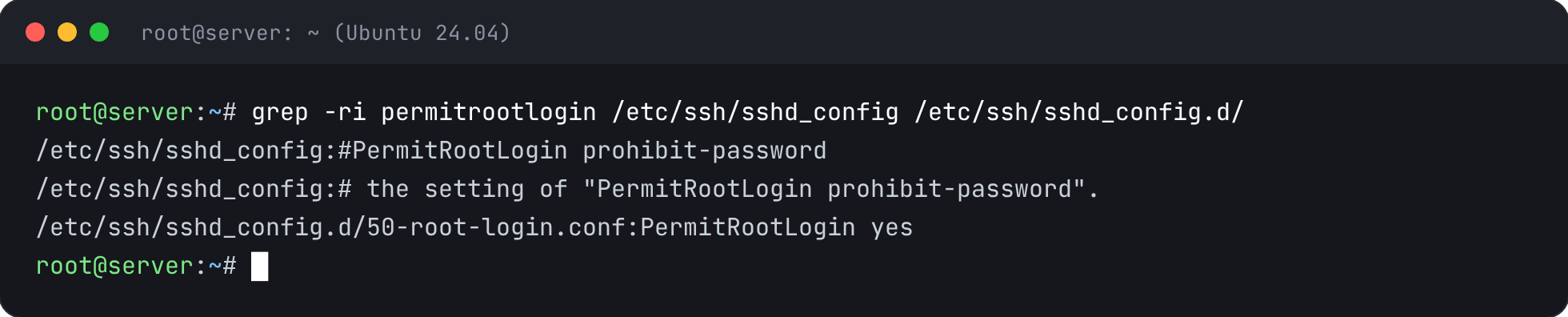
- 3
Allow root by key only
Add a small file that allows root with a key but never a password. Because SSH uses the first value it reads, this file wins over the line that says yes, wherever that is.
echo 'PermitRootLogin prohibit-password' > /etc/ssh/sshd_config.d/10-frabs-root.conf
- 4
Check the config and reload SSH
sshd -t checks the config for mistakes first, so a typo can't lock you out. Reloading keeps your current session open.
sshd -t && systemctl reload ssh && echo reloaded
- 5
Confirm it worked
It should now say prohibit-password (shown as without-password on some versions).
sshd -T | grep -i permitrootlogin


Check It’s Fixed
Run the security report again. This check should now pass.