Open Services · about 10 minutes
Close Databases and Admin Services to the Internet
What This Means
A database or admin service (MySQL, Redis, MongoDB, Docker's API, VNC and others) listens on every address, so anyone on the internet can reach it.
Why It Matters
These are scanned for constantly. An open Redis or MongoDB is usually taken over within hours; an open MySQL gets endless password guessing.
- 1
See what listens on every address
0.0.0.0 or [::] means reachable from anywhere; 127.0.0.1 means this server only. Here a service is open on 6379, Redis's port.
ss -tlnp | grep -E '0.0.0.0|\[::\]'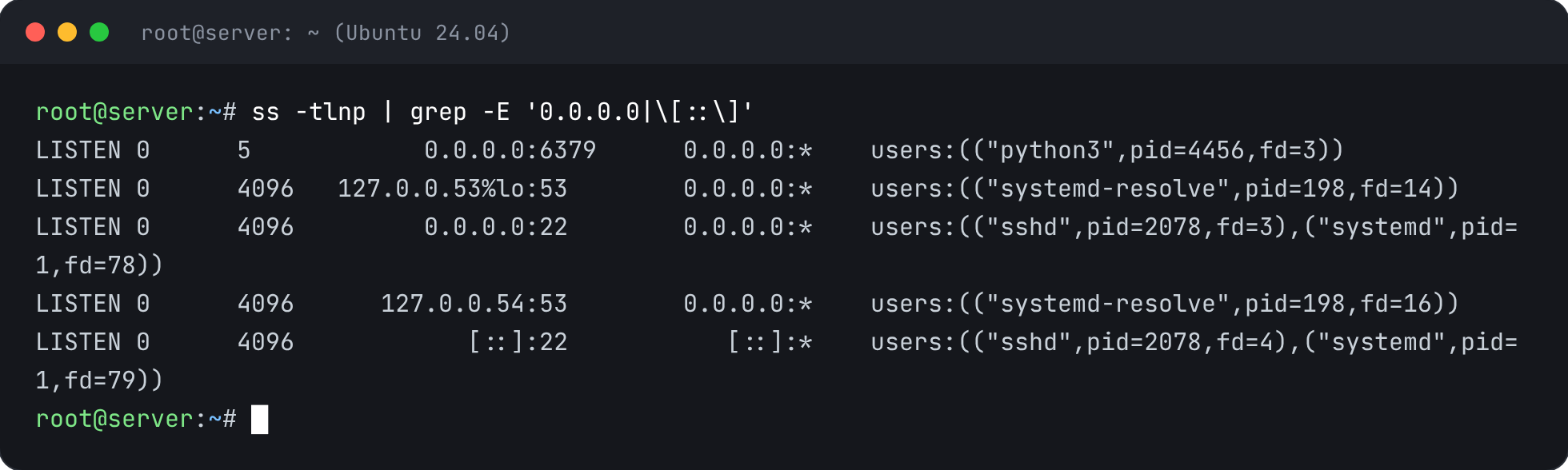
- 2
Bind it to this server only
The best fix: tell the service to listen on 127.0.0.1. For MySQL or MariaDB set bind-address = 127.0.0.1 under [mysqld]; for Redis set bind 127.0.0.1 -::1 and protected-mode yes; for MongoDB set net.bindIp: 127.0.0.1. Then restart it, for example:
sed -i 's/^bind .*/bind 127.0.0.1 -::1/' /etc/redis/redis.conf && systemctl restart redis-server - 3
Or allow only your own addresses
If another server needs it, open it only to that server's address in the firewall (see Turn On a Firewall).
ufw allow from 203.0.113.10 to any port 6379 proto tcp - 4
Confirm it's closed
Once fixed, it listens on 127.0.0.1 only and no longer shows on 0.0.0.0.
ss -tlnp | grep 6379


Check It’s Fixed
Run the security report again. This check should now pass.